Mobile learning is one of the formats making that possible. Student loans, SATs, pricey tutors, and stacks of heavy books are quickly becoming relics of the past. Today, paperwork and expenses give way to affordable, practical educational apps. And if you’re considering eLearning software development, your idea could be the next step in reshaping how people teach and learn. Let’s walk through the key reasons why educational apps matter and how you can make your idea work.
Why mobile learning?
For most of history, learning happened in one place: the classroom. Whether at school, university, or a training course, education was something you had to show up for physically. But mobile technology changed the rules. Now, studying doesn’t stop when you walk out the door; it follows you anywhere, turning education into something interactive and flexible.
With that shift comes a whole new level of convenience, plus plenty of other benefits worth exploring
Accessibility and affordability
In the fall of 2011, three Stanford professors opened their classrooms to the world at once.
Sebastian Thrun and Peter Norvig put Introduction to AI online and watched enrollment explode to ~160,000 learners.
At the same time, Andrew Ng’s Machine Learning course topped 100,000 sign-ups, and Jennifer Widom’s Databases course drew another vast global audience. Together, these courses showed that world-class education didn’t have to be locked behind campus walls or tuition invoices.
That moment didn’t invent online learning, but it proved something crucial: when high-quality content meets the open web, access scales. Since then, a phone and the right app have been enough for many learners to start studying on their own terms, often at little cost. And although the digital divide still exists, far more people can reach quality learning than before.
Engagement enhancement
In 2021, U.S. students highlighted convenience and affordability as the top reasons for choosing remote education. When learning fits into a device they already use daily, aka their smartphone, it stops feeling like a chore and becomes part of everyday life.
Interactive mobile apps take this further by making education more engaging and personal. They keep students connected to their institution, instructors, or even an educational brand, creating a two-way channel rather than a one-sided lecture. Features like real-time feedback, push notifications, and in-app discussions help sustain motivation and prevent learning from slipping into the background.
Collaboration
Mobile apps make it easy for students to stay connected with peers and teachers around the clock. This constant access doesn’t just increase the time they spend learning, but also builds collaboration skills and fosters the kind of networking that’s invaluable long after the course is over.
Continuous learning
According to Statista, people spend about 4 hours per day on their smartphones. Mobile applications give the opportunity to continue studying whenever and wherever one may need. It turns learning into an ongoing process. Instead of being a short-term relationship, your app may become their daily source of entertainment through learning.
What are the types of educational apps?
Education apps rank among the most popular categories worldwide, holding the fourth spot in the App Store (9.56%) and the second spot on Google Play (10.4%). And while some may picture education as nothing more than school textbooks and tests, the reality is much broader. Think of apps for learning languages, practicing piano, solving puzzles, or accessing full online courses.
Educational app development keeps evolving, introducing fresh formats and concepts every year. So far, the most distinct types of mobile apps for education are the following.
Multipurpose learning platforms
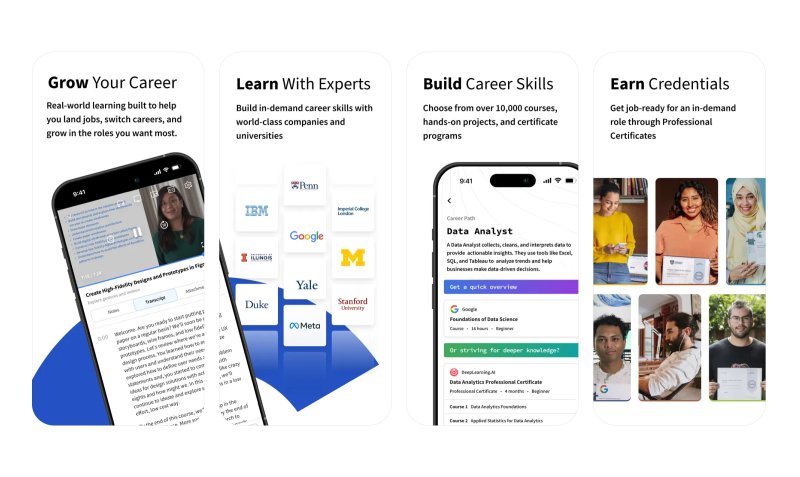
Educational platforms do not limit themselves to only one course or one scientific sphere. One would be able to find and enroll in any course, even a full-scale graduate program, no matter the age, financial status, nationality, or any other obstacles (e.g., Google Classroom).
Let’s look at the example of Coursera, which started as a Stanford-only online platform and developed into a site of enormous possibilities in education. Thus, while it sounds impressive, creating a similar compatible product requires a lot of funds, time, and database capacity.
Source: App Store
Specific subject learning app
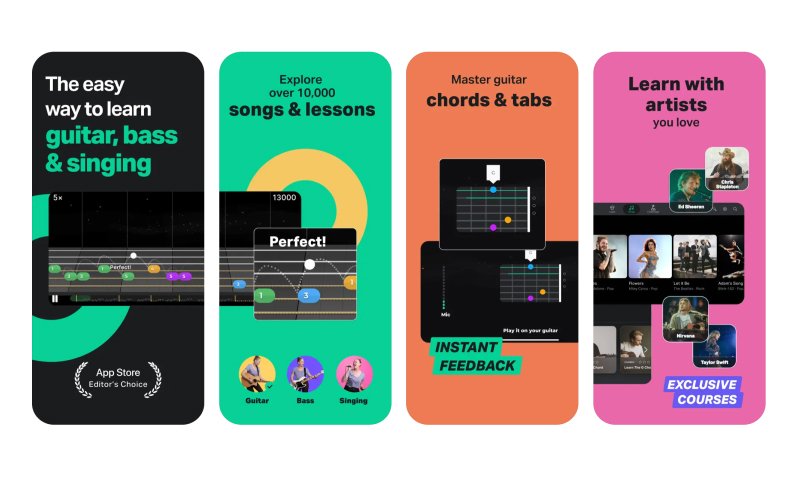
Countless apps focus on providing the studying process for only one particular subject, varying from Duolingo for language studies to Yousician for mastering new music instruments.
Source: App Store
Supportive apps
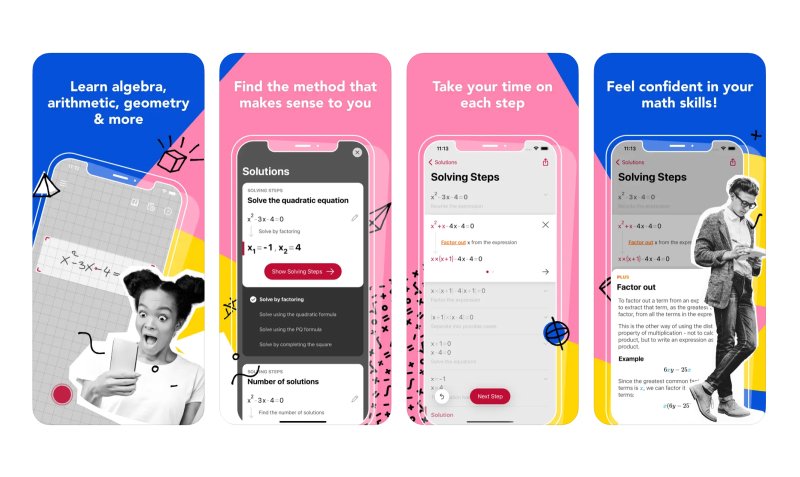
These are the apps that do not teach. Instead, they help to ease the studying process. Some apps deal with small tasks like solving equations written in a notebook (Photomath) or correcting grammar (Grammarly).
Source: App Store
Educational games
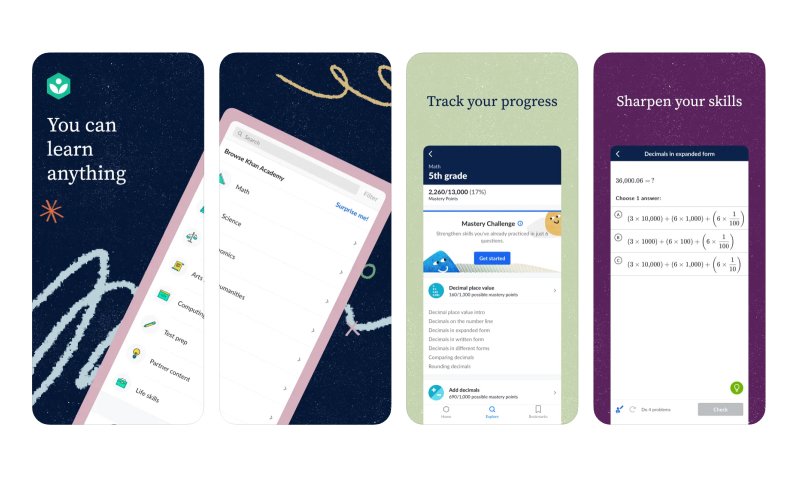
Studying is good, but interactive studying is better. Training the brain inside a gamified environment allows students to take their mind off heavy stuff while continuing to pick up something new. Khan Academy’s app does a great job at engaging users through adventurous gamification.
Source: App Store
Learning management app
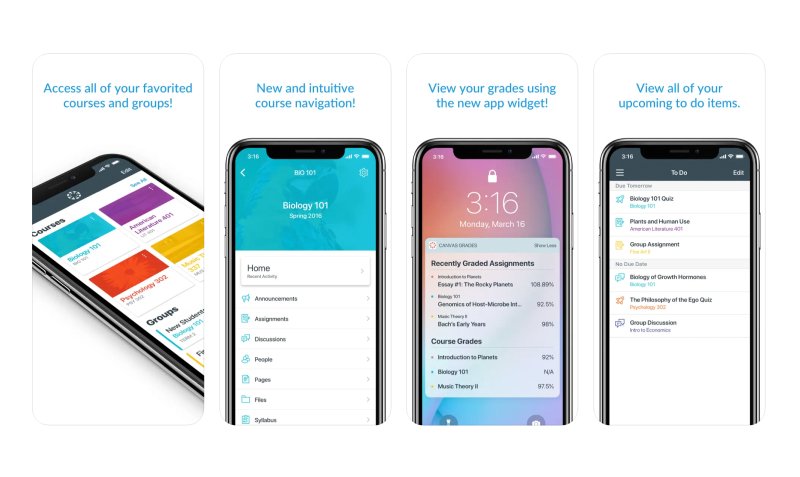
These are apps that can be used collectively by members of a specific educational institution or separately by students for their purposes (e.g., Canvas Student). They are designed to handle the formalities and ease the communication between school and student regarding personal schedules, attendance control, work submission, grading, and so on.
Source: App Store
Educational apps for preschoolers and toddlers
The brain of a small toddler works differently from that of those old enough to attend school. Their attention span is shorter, and their comprehension abilities are still in the phase of early development. Particular applications aimed at children aged 0-5 are bright, gamified, and interactive to grab kids’ interest and make sure they learn in the process of being entertained (check out Endless Alphabet and Prodigy Math Game).
Learning through practice
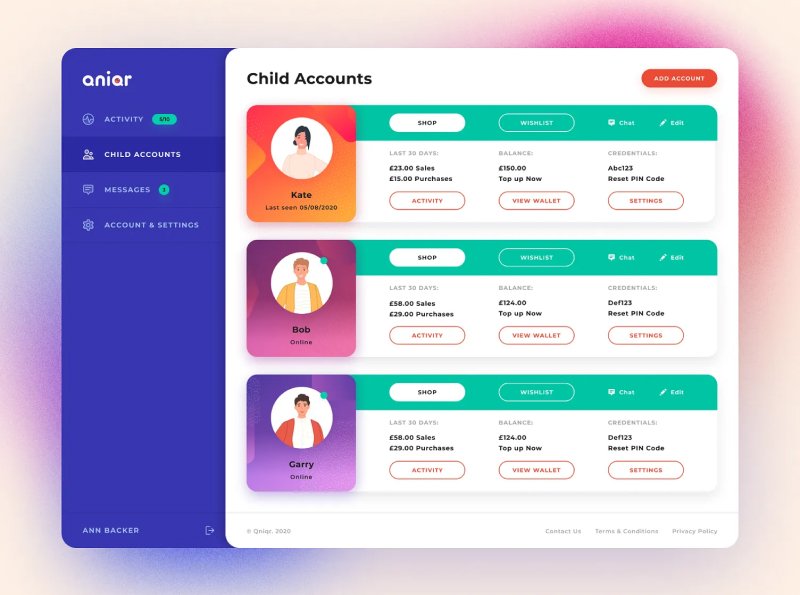
Some of the most impactful learning happens by doing. Practical learning apps allow students to apply knowledge in real-world scenarios. For example, this marketplace app helps children and teens practice financial management by selling items, turning abstract money lessons into hands-on experience.
Source: Dribbble
What are the core features for an educational app?
Usually, the application development process consists of similar common phases: planning, design, set of features, testing, and deployment.
Educational apps are not different. They may include the most different features and learning modules, but the most common features every educational application development team should foresee are the following.
Registration and log-in
A smooth onboarding experience is essential. Students and teachers should be able to register quickly, log in securely, and save their progress across devices. This feature typically requires about 80 hours of development.
Customizable profile
The most significant part of the education app user community is students. They should have an ability to have a personal page with information about who they are, what faculty or grade they belong to, what classes they take, what assignments are due, and access to their grades (if it can also show the approximate GPA, that’d be awesome).
To develop this feature, your education app developers will need from 105 to 140 hours.
Feed
A dynamic feed helps users stay up to date with class changes, announcements, or schedule updates. For lecturers, it can highlight new submissions or grading tasks. Average development time – 155 hours.
Courses page
Surely, every class or course should have its own separate page with a detailed plan, lectures, schedule, assignments, information about the lecturer, a list of students attending, and any other essential information.
Development is going to take approximately 80 hours.
Audio and video streaming
The mechanics behind live-streaming are that the ongoing stream goes to the server, where it is converted and sent to the user who watches the broadcast. At the same time, the video is recorded and stored if needed. However, the time limits for storing are decided by the developers and depend on the storage and processing capacities of servers.
Apart from online courses taken in real time, users also need to have the ability to re-watch the lecture or re-listen to the broadcast that is a part of their curriculum. So it’s best to think about the server part in advance.
For a simple MVP, about 80 hours for the frontend and 80 hours for the backend will be enough. However, the top-notch steaming feature can take up as many as 600 hours to build.
Search
Some students would like to check out the courses their friends take or learn about what they will be taking next year. Developing a detailed search with different features is going to enhance their user experience.
Time needed: 110 hours.
Push notifications
Students and lecturers would like to get notified about all the slightest changes that occur in their studying/teaching process, like shifts in timetables, new assignments and grades, deadlines, and so on.
Creating push notifications takes about 111 hours.
Offline mode
Connectivity shouldn’t get in the way of learning. Downloadable lectures, saved test results, and offline course materials make education more reliable. Building offline functionality takes about 115 hours.
Database
The most valuable thing to tune is the database that is going to store all the information about ongoing, past, and future courses, personal information of every user, their education process, and all course materials.
The amount of time needed to set up a database successfully cannot be calculated before actually doing it. In real life, it can take months just to set it up.
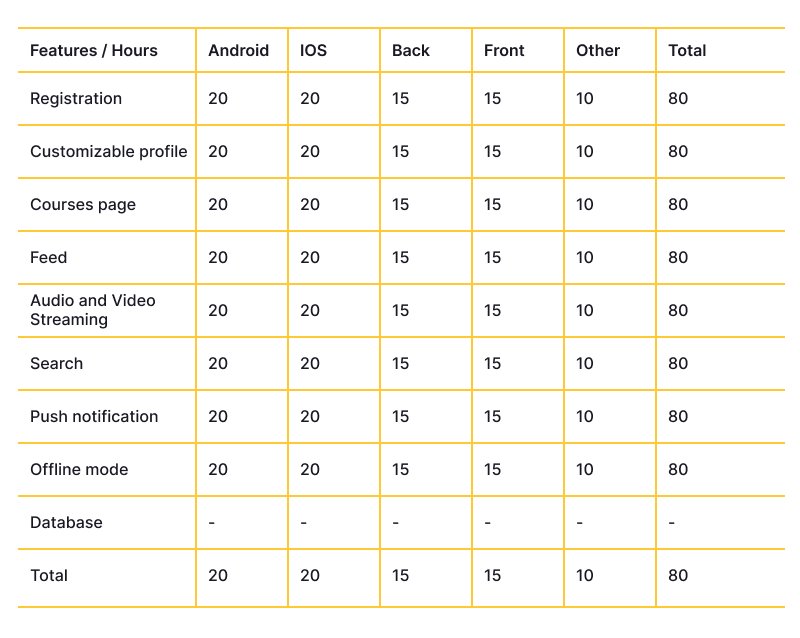
Approximate time-cost estimate
Closing thoughts
If this article shows anything, it’s that education has outgrown the classroom. What once required tuition fees, heavy books, and strict schedules is now available on demand and adaptable to every learner’s pace, interest, and circumstance. Mobile learning turned education into something continuous, personal, and accessible, not just an obligation checked off in school years.
The real opportunity today lies in building apps that carry this promise forward. With the right approach to eLearning software development, your idea can become more than an app; it can be the tool that helps someone learn a new skill, change a career, or simply stay curious. Done well, that’s the kind of impact that lasts.