Why develop a mobile app for your business?
Most companies consider building apps, but many end up never doing that. Those who do, though, often get ahead of competitors because apps make customer acquisition and retention easier.
Here’s some evidence:
- Almost seven billion people own smartphones
- Mobile is expected to drive 75% of total eCommerce sales by year-end 2025
- The global in-app advertising market was estimated at $182.06 billion in 2024
- Mobile eCommerce generated $4.34 trillion worldwide in 2023, a figure expected to climb past $7.08 trillion by 2027
- Businesses with apps receive higher revenues and customer satisfaction
So, a mobile app can be an avenue for acquiring and retaining customers. Besides, businesses with mobile apps make better impressions than those without, so there’s a lot to gain reputation-wise, too.
Once you decide to make the app, you’ll need to choose between in-house or outsourcing development. This decision includes whether your IT crew can produce the app in-house or whether it’s more cost-effective to outsource app development.
Next, it’s time to get the ball rolling.
How to develop a mobile app: Core phases
To develop the app, it will need to go through six stages: discovery & research, planning, UI/UX design, development, testing, and deployment & maintenance. This mobile app development process ensures that you’ll cover all bases.
Phase I: Discovery
Goal: Develop the strategy for building the app
Activities: App concept design, market research, user persona development, competitor research, platform selection
The first phase focuses on planning the strategy for the entire project. For that, you’ll need to collect information to inform your decisions about everything.
The main points that need our attention are the market, target users, app’s goals, marketing, programming language, and platform compatibility.
Here’s how these translate into research:
- Market. Collect information about similar popular apps, their features, advantages & disadvantages, and their users’ feedback.
- Target users. Identify the target user as well as the needs, goals, and problems the future app can help with (aka make a user persona)
- App’s goals. Establish the goals and objectives based on your research of the market and target users.
- Marketing. Choose ways to market and promote your future app (app stores, paid ads, influencers, awards, content, etc.
- Programming language. Select the mobile app development language and framework that coders will use to create the product.
- Platform compatibility. Decide whether you want the app to be available for iOS, Android, or both platforms.
Once you’re done researching, you should understand how your future app will help a specific group of target users. This knowledge will be your North Star, guiding you throughout the entire project.
Next, for example, you’ll use that knowledge to define specific benefits to users and plan project milestones.
Phase II: Planning
Goal: Product roadmap development
Activities: Definition of use cases and their requirements, MVP (Minimum Viable Product) development
We’ve outlined everything to achieve to make your app a reality. Now, our mobile app development project turns to more specific planning.
The planning boils down to one important thing: the product roadmap. It’s a strategic document that describes the major stages of the app development process and combines your business goals and product vision.
A product roadmap for a mobile app contains:
- Use cases. Specific situations in which people will use the app.
- Milestones. Schedule points, noting the start and finish of major achievements.
- Goals. Measurable project goals defined by specific metrics.
- Activities. List of activities and processes needed to accomplish goals.
- Deadlines. Time necessary to develop features or advance to the next stage.
- Strategy. Contains detailed functional requirements and activities to achieve them.
- Features. Pieces of functionality designed to help users achieve their goals.
Creating a great app roadmap is all about organizing and prioritizing activities and goals. Since a lot of different variables are involved, a business owner gets assistance from a project manager and other project stakeholders.
Phase III: UX/UI design
Goal: Design effortless app experiences
Activities: Development of user journey map, prototypes, and mockups
Engaging. Easy to use. Intuitive. The best apps have those characteristics in common. The UX/UI phase helps to achieve them by creating app sketches that get tested and improved. This process looks like this.
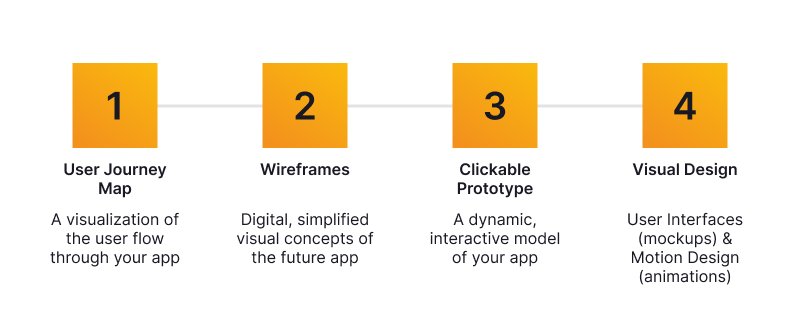
Wireframes are app sketches UI/UX designers create to help understand how the final product will look and “feel.” The sketches will be included in the user journey map, a visual representation of user sessions inside the future app.
Once approved, wireframes are “converted” into clickable prototypes — images of app screens with clickable hotspots. With them, you can move from screen to screen as if you’re using a real-world product.
By using and testing the prototypes, you and your team will define how good the future product is. Any needed design improvements are marked and implemented at this phase to ensure the best design.
Once the process has been completed, the designers will compile all graphic elements and design guidelines into so-called style guides. These documents are important because UI/UX designers use them to ensure that the app design stays consistent.
Typical mobile app style guides include:
- Fonts
- Layouts
- Graphics
- Color schemes
- Menus and bars
- Dialog and error windows
Phase IV: Development
Goal: Get the app ready for users
Activities: Code development, UI design
The next step is simple: the app is getting built.
Technically speaking, your development team will turn the prototypes into a working app. This process is broken into two-week-long periods, with each one focusing on a specific feature. At the end of each period, features (or so-called “builds”) are released to testers and the client.
Besides the time, the development process is also divided into technology-driven periods: back end, front end, and API.
Here’s what those mean:
- Back end. Refers to server-side functionality that makes the app work as intended (databases, scripting, etc.)
- Front end. Called the “user side,” it includes building functionality that people actually can interact with (buttons, colors, images, menus, etc.)
- API (Application Programming Interface). Includes a set of protocols and features that enable communication between the back end and front end.
To ensure proper app functioning, your front-end and backend developers will collaborate. Once they are done with everything (this also includes testing), the project will be handed over to the client for approval.
How long does the development take? Well, development could last several weeks for simple apps, but a complex one might take months. Your project team will estimate the duration before any coding is done, so the time won’t be a surprise at this point.
Phase V: Testing
Goal: Ensure error-free app performance.
Activities: UX, functional, device, performance, and security testing.
Remember that the “builds” are released to testers at the end of two-week periods? This is where the quality assurance (QA) team comes in. It has a huge role to play in the mobile app development process: ensure that the app is stable, fast, and secure.
The QA team employs these procedures:
- UX testing. Designed to ensure consistent fonts, color schemes, navigation, style treatments, etc.
- Device testing. Ensures that the app runs smoothly on the chosen devices and platforms (Android, iOS, others).
- Security testing. Intended to discover any potential security vulnerabilities and errors that impact performance, user data protection, etc.
- Functional testing. Designed to ensure that people can use the app’s features and get intended outcomes in every scenario.
- Performance testing. Involves testing the app based on a number of speed, responsiveness, efficiency, and load-related factors.
The procedures might differ depending on the project. Once a problem is detected, testers provide developers with the information to find it. After all errors and bugs are fixed, the app is stable, secure, and ready to handle large loads.
Phase VI: Deployment and maintenance
Goal: Ensure problem-free launch and long-term performance.
Activities: App Store Optimization (ASO), promotion, maintenance (post-sales support).
Time to make your product available to users. Typically, this means releasing the app on the chosen app store (Google Play for Android devices, App Store for iOS, or both).
But before we actually do that, we need to think about promoting it. With 3.5 million apps on Google Play alone, proper marketing is a must to attract users. To achieve that, it’s a good idea to do both App Store Optimization (ASO) and external marketing.
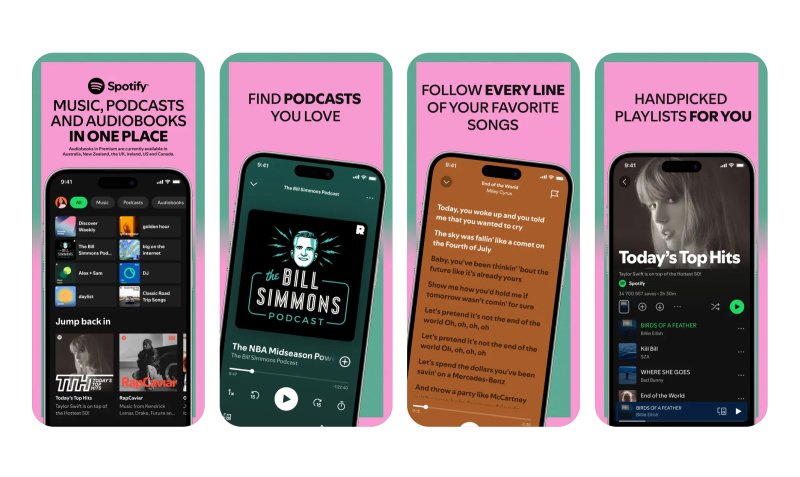
ASO means getting the app ready for an app store, which includes keyword research, app description writing, and production of visuals (the logo, screenshots, and/or videos).
Here’s a typical description and visuals (courtesy of the Spotify app).
Source: App Store
Next, external marketing. This strategy involves promoting the new app using sources other than the app store:
- Blog articles
- Social media posts
- Third-party websites
- Your company’s website
- Paid advertising campaigns
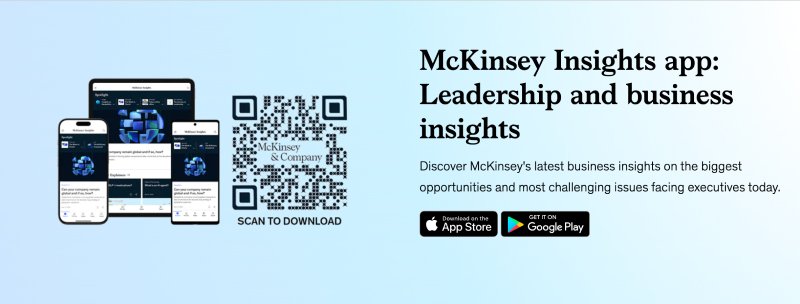
Example: McKinsey promotes its mobile app on the company’s blog.
Source: McKinsey.com
Your project team will advise you to start promoting your new mobile app before it becomes available. This strategy will help you raise some awareness of the new product and score you some quick downloads and installs.
Once you’re ready to deploy, your developers will release the app to the chosen app store. Congratulations! Your project is finally live, collecting users. Now, your job is to engage them and continue the marketing effort.
Finally, the mobile app development process comes to the last step: maintenance.
This means making:
- Bug fixes to remove errors
- Functional and design updates
- Reviews of user and sales analytics
Since smartphone manufacturers constantly update their systems and requirements, the app will also need updates to function. Besides, you might also want to refresh the interface regularly to reflect the latest design trends and user preferences.
Mobile app alternatives
Want your products or services available on more than mobile devices? Then you might want to consider alternatives:
- Hybrid mobile apps. Combine elements of web apps and native apps (developed specifically for Android or iOS)
- Progressive web apps. Hybrids between a mobile app and a website that look and function well on any device and browser
- Mobile responsive websites. Sites that are designed and optimized for mobile devices so they work well regardless of screen size, layout, or browser.
Useful guides on the mobile app development process
Mobile app development is a great business investment that can pay nice dividends. If you want to learn more about this topic, check out these reads:
- How to build an eCommerce app
- Hotel booking app development [Process & strategy breakdown]
- Farms of the future: Application development for agriculture
Conclusion
Building a mobile app takes more than writing code. It requires clear strategy, thoughtful design, thorough testing, and ongoing improvements. Each stage shapes the final product and determines whether people will find it useful and engaging.
Apps that succeed are built with purpose. They come from careful planning, solid execution, and the willingness to refine until everything works as intended.
If you’re preparing to create one, it helps to see how others have done it. Globaldev has partnered with companies across industries to build mobile solutions that scale, attract users, and deliver measurable results. Our client case studies show what that journey looks like in practice.